-
- 로그인후 이용해주세요.
팁과노하우
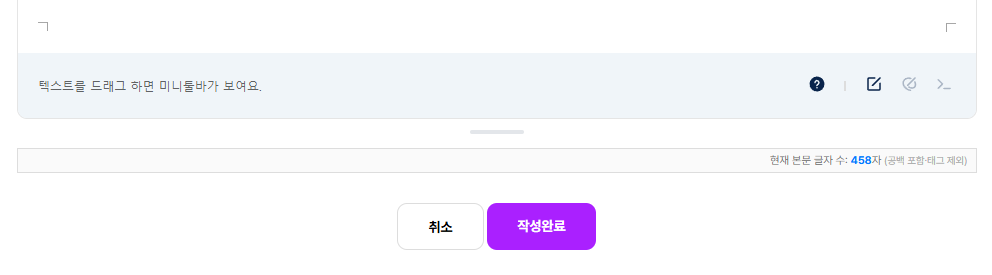
rb에디터에 실시간 글자수 카운트를 넣어보자. 에디터 원본 수정 없음.




조금 귀찮은 작업을 해야합니다.
에디터가 출력되는 write.skin.php 파일에서 아래 코드를 에디터가 출력되는 아래쪽에 넣어시면 됩니다.
하단에 보면 글자수 카운트에 따라 카운트 숫자 색을 다르게 보이게도 적용할 수 있습니다.
rb에디터에 글자수 카운트 기능이 들어가면 아래 코드는 사용할 필요 없습니다. ㅎㅎ
아래 이미지처럼 에디터 조절바 바로 밑에 출력이 됩니다.
<!-- 1. 글자 수 표시 레이아웃 (높이 조절바 밑에 이질감 없이 녹아들도록 스타일 수정) -->
<div class="rb-word-counter" id="rb_word_counter_box" style="text-align: right; padding: 5px 8px; font-size: 11px; color: #777; background: #fafafa; border: 1px solid #ddd; margin-top: 4px; margin-bottom: 15px; display: none;">
    현재 본문 글자 수: <strong id="pure_char_count" style="color: #007bff; font-size: 11px; font-weight: bold;">0</strong>자
    <span style="font-size: 10px; color: #aaa;">(공백 포함·태그 제외)</span>
</div>

<!-- 2. 에디터 프레임 전체 구조 파악 및 하단 배치 스크립트 -->
<script>
document.addEventListener("DOMContentLoaded", function() {
    var checkCount = 0;

    var findRbEditorFrame = setInterval(function() {
        checkCount++;

        // 1. 에디터 내부의 글자 입력 iframe 탐색
        var editorIframe = document.querySelector("iframe[id^='editor_'], .se-wrapper-inner iframe, iframe");

        // 2. [핵심] 리빌더 에디터 전체를 감싸고 있는 최외곽 박스(.sun-editor)를 탐색합니다.
        var sunEditorMain = document.querySelector(".sun-editor, .se-container, [class*='editor']");
        var counterBox = document.getElementById("rb_word_counter_box");

        if (editorIframe && editorIframe.contentWindow && editorIframe.contentDocument && sunEditorMain && counterBox) {
            var iframeDoc = editorIframe.contentDocument;
            var editorBody = iframeDoc.querySelector("#editor") || iframeDoc.body;

            if (editorBody) {
                clearInterval(findRbEditorFrame);

                // [위치 조정 핵심] 에디터 전체 박스(.sun-editor) 바로 '바깥쪽 아랫줄'에 카운터 박스를 밀어 넣습니다.
                // 높이 조절바는 에디터 박스 내부에 속해 있으므로, 박스 바로 아래에 붙이면 조절바 밑에 완벽히 달라붙습니다.
                sunEditorMain.parentNode.insertBefore(counterBox, sunEditorMain.nextSibling);
                counterBox.style.display = "block"; // 화면 노출 보장

                // 최초 글자 수 세팅
                updateWordCount(editorBody.innerHTML);

                // iframe 내부 실시간 감시 기동
                var observer = new MutationObserver(function(mutations) {
                    updateWordCount(editorBody.innerHTML);
                });

                observer.observe(editorBody, {
                    childList: true,
                    characterData: true,
                    subtree: true
                });
            }
        }

        if (checkCount > 50) clearInterval(findRbEditorFrame);
    }, 300);

    // 글자 수 정제 및 출력 함수
    function updateWordCount(htmlContent) {
        if (!htmlContent) {
            document.getElementById('pure_char_count').innerText = 0;
            return;
        }

        var tempDiv = document.createElement("div");
        tempDiv.innerHTML = htmlContent;
        var pureText = tempDiv.textContent || tempDiv.innerText || "";

        // 연속된 공백 및 줄바꿈 제거 (서버 PHP 검증 규칙과 100% 일치)
        // pureText = pureText.replace(/\s+/g, '');
        // 줄바꿈이나 연속된 띄어쓰기를 딱 1칸의 스페이스로 압축하고 앞뒤 공백을 자릅니다.
        pureText = pureText.replace(/\s+/g, ' ').trim();

        var textLength = pureText.length;
        document.getElementById('pure_char_count').innerText = textLength;

        var countEl = document.getElementById('pure_char_count');
        if (textLength >= 1000) {
            countEl.style.color = '#28a745';
        } else if (textLength >= 500) {
            countEl.style.color = '#fd7e14';
        } else {
            countEl.style.color = '#007bff';
        }
    }
});
</script>
write.skin.php 에 적용한 예제입니다. 적용할 위치 참고하세요.
    <!-- 내용 { -->
    <div class="rb_inp_wrap">
        <ul>
            <div class="wr_content <?php echo $is_dhtml_editor ? $config['cf_editor'] : ''; ?>">
                <?php if($board['bo_write_min'] || $board['bo_write_max']) { ?>
                <!-- 최소/최대 글자 수 사용 시 -->
                <p id="char_count_desc" class="help_text">이 게시판은 최소 <strong><?php echo $board['bo_write_min']; ?></strong>글자 이상, 최대 <strong><?php echo $board['bo_write_max']; ?></strong>글자 이하까지 글을 쓰실 수 있습니다.</p>
                <?php } ?>
                <?php echo $editor_html; // 에디터 사용시는 에디터로, 아니면 textarea 로 노출 ?>

                <?php if($board['bo_write_min'] || $board['bo_write_max']) { ?>
                        <?php if(!$is_dhtml_editor) { ?>
                        <div id="char_count_wrap"><span id="char_count"></span>글자</div>
                        <?php } ?>
                <?php } ?>

            </div>

            <?php if(!$is_dhtml_editor) { ?>
            <style>
                .wr_content>textarea {
                    overflow: hidden;
                }
            </style>
            <script>
                //에디터가 아닌경우 textarea의 높이 자동설정
                $(document).ready(function() {
                    $('.wr_content > textarea').on('input', function() {
                        this.style.height = 'auto'; /* 높이를 자동으로 설정합니다. */
                        this.style.height = (this.scrollHeight) + 'px'; /* 스크롤 높이를 textarea에 적용합니다. */
                        this.style.minHeight = '300px';
                    });
                });
            </script>
            <?php } ?>
        </ul>
    </div>
    <!-- } -->

<!-- 1. 글자 수 표시 레이아웃 (높이 조절바 밑에 이질감 없이 녹아들도록 스타일 수정) -->
<div class="rb-word-counter" id="rb_word_counter_box" style="text-align: right; padding: 5px 8px; font-size: 11px; color: #777; background: #fafafa; border: 1px solid #ddd; margin-top: 4px; margin-bottom: 15px; display: none;">
    현재 본문 글자 수: <strong id="pure_char_count" style="color: #007bff; font-size: 11px; font-weight: bold;">0</strong>자
    <span style="font-size: 10px; color: #aaa;">(공백 포함·태그 제외)</span>
</div>

<!-- 2. 에디터 프레임 전체 구조 파악 및 하단 배치 스크립트 -->
<script>
document.addEventListener("DOMContentLoaded", function() {
    var checkCount = 0;

    var findRbEditorFrame = setInterval(function() {
        checkCount++;

        // 1. 에디터 내부의 글자 입력 iframe 탐색
        var editorIframe = document.querySelector("iframe[id^='editor_'], .se-wrapper-inner iframe, iframe");

        // 2. [핵심] 리빌더 에디터 전체를 감싸고 있는 최외곽 박스(.sun-editor)를 탐색합니다.
        var sunEditorMain = document.querySelector(".sun-editor, .se-container, [class*='editor']");
        var counterBox = document.getElementById("rb_word_counter_box");

        if (editorIframe && editorIframe.contentWindow && editorIframe.contentDocument && sunEditorMain && counterBox) {
            var iframeDoc = editorIframe.contentDocument;
            var editorBody = iframeDoc.querySelector("#editor") || iframeDoc.body;

            if (editorBody) {
                clearInterval(findRbEditorFrame);

                // [위치 조정 핵심] 에디터 전체 박스(.sun-editor) 바로 '바깥쪽 아랫줄'에 카운터 박스를 밀어 넣습니다.
                // 높이 조절바는 에디터 박스 내부에 속해 있으므로, 박스 바로 아래에 붙이면 조절바 밑에 완벽히 달라붙습니다.
                sunEditorMain.parentNode.insertBefore(counterBox, sunEditorMain.nextSibling);
                counterBox.style.display = "block"; // 화면 노출 보장

                // 최초 글자 수 세팅
                updateWordCount(editorBody.innerHTML);

                // iframe 내부 실시간 감시 기동
                var observer = new MutationObserver(function(mutations) {
                    updateWordCount(editorBody.innerHTML);
                });

                observer.observe(editorBody, {
                    childList: true,
                    characterData: true,
                    subtree: true
                });
            }
        }

        if (checkCount > 50) clearInterval(findRbEditorFrame);
    }, 300);

    // 글자 수 정제 및 출력 함수
    function updateWordCount(htmlContent) {
        if (!htmlContent) {
            document.getElementById('pure_char_count').innerText = 0;
            return;
        }

        var tempDiv = document.createElement("div");
        tempDiv.innerHTML = htmlContent;
        var pureText = tempDiv.textContent || tempDiv.innerText || "";

        // 연속된 공백 및 줄바꿈 제거 (서버 PHP 검증 규칙과 100% 일치)
        // pureText = pureText.replace(/\s+/g, '');
        // 줄바꿈이나 연속된 띄어쓰기를 딱 1칸의 스페이스로 압축하고 앞뒤 공백을 자릅니다.
        pureText = pureText.replace(/\s+/g, ' ').trim();

        var textLength = pureText.length;
        document.getElementById('pure_char_count').innerText = textLength;

        var countEl = document.getElementById('pure_char_count');
        if (textLength >= 1000) {
            countEl.style.color = '#28a745';
        } else if (textLength >= 500) {
            countEl.style.color = '#fd7e14';
        } else {
            countEl.style.color = '#007bff';
        }
    }
});
</script>

    <!-- 비회원 { -->
    <?php if ($is_name) { ?>
    <div class="rb_inp_wrap">
        <ul class="guest_inp_wrap">

            <lebel class="help_text">작성자 정보를 입력해주세요. 비밀번호는 게시글 수정 시 사용됩니다.</lebel>


- 이전글.htaccess 에 new, search 추가하기2026.08.19
- 다음글rb에디터에서 주소를 넣을 때 메타정보가 출력되지 않는다면...2026.08.11
댓글목록
등록된 댓글이 없습니다.